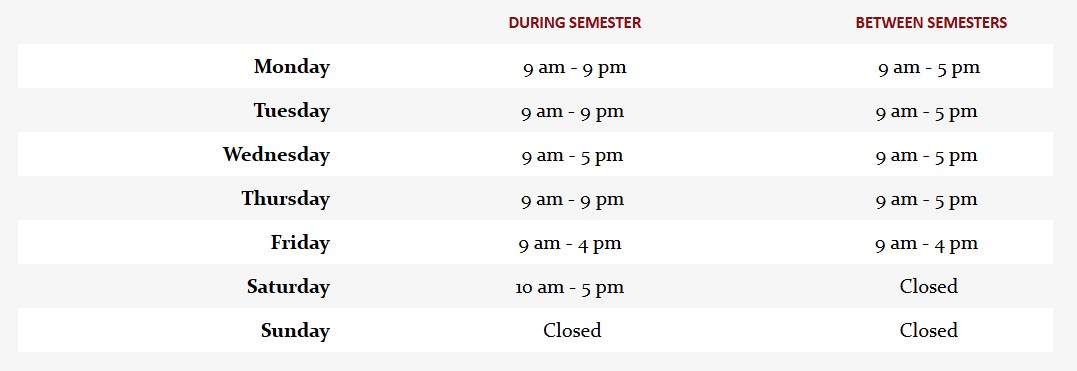
What are the library's normal operating hours?
Library hours change during finals, reading week, and holiday breaks. To check to see if the library is open, please call (601) 923-1623.
What is the check-out period for books?
The check-out period for all items except reserve books is three-weeks. Books are never due on a day the library is closed. The loan period for Reserve books is three hours, and they may not be taken from the library.
How do I renew the items I have checked out? Can I renew them online?
You may renew your items at the circulation desk at the library, or online through your account available on the online catalog--the login is at the top right corner. You will need your library card number and PIN number to access your account. Your default PIN number is the last four digits of your barcode number.
RTS students and Alumni may renew each item twice unless it is needed to fulfill a class reserve reading. Other library users may renew each item once. The new date is three weeks from the date of renewal, and it is not added on to the previous due date.
Once you have reached your renewal limit for an item, you must return it to the library to be re-shelved and made available for other students and library users.
The below video demonstrates the renewal process,
When can I return items I have checked-out?
You return your items at the circulation desk during normal operating hours of the library. A book drop is located by the library entrance for returning items after-hours.
How much are overdue fines?
RTS students are not charged overdue fines. For all other library patrons, the charge is .10 per day up to a maximum of $10 per item. If a book has been overdue long enough, it will be set to lost and the price of a replcaement copy plus $5.00 assigned to the account.
What if I've lost or damaged a book?
We encourage you to replace lost or damaged items with an identical item in new, like-new, or very good condition.
For books, the replacement item must be completely free of underlining, writing, highlighting, stains, a torn cover or any pages, as well as have solid binding.
For media items, they must come with all of the original packaging and supplemental material, such as guidebooks, transcripts, or liner notes.
If the lost or damaged item is not replaced, the cost will be equal to the retail price of a new item plus a $5 processing fee. Library staff will determine the final replacement cost for all items.
Any overdue fine for a lost or damaged book is waived, and not added to the replacement cost.
What if I need a book or a journal article that the library does not own?
The library will make every effort to obtain a resource you need. When you find a book or a journal article you need that is not owned by the Jackson library, you must submit an Interlibrary Loan request for it.
Book requests from other RTS campuses usually arrive in 5-7 business days. Book requests from other institutions may take 2-3 weeks. Article scans usually arrive in 2-5 business days.
The Jackson library provides the Interlibrary Loan service to currently enrolled RTS students. This service is not available to other library users.
How do I make an Interlibrary Loan request?
You may submit your interlibrary loan request online here, or email library.jackson@rts.edu.
Please provide as much bibliographic information as possible. For books, that includes Title, Author, Edition or Year, and ISBN. For articles, that includes Article Title, full Journal Title (no acronyms or abbreviations,) Author, Volume, Year, Number, and the page range. Providing the ISSN is also helpful.
Book requests from other RTS campuses usually arrive in 5-7 business days. Book requests from other institutions may take 2-3 weeks. Article scans usually arrive in 2-5 business days. Interlibrary book request are sometimes fulfilled by adding the title to the collection, or adding it as an e-book.
You are notified of the status of any Interlibrary Loan requests through the e-mail used to submit the request.
How do I access the library's databases off-campus?
When you are off-campus, use these Database links to reach the RTS Sign-In.
Use your student.rts.edu or rts.edu e-mail and password to Sign-In.
MAC Students: Accessing the MAC databases when you are not on campus requires a separate set of login credentials for each database. Please send a request with your name and student id to library.jackson@rts.edu to receive the current login id and password.
I need to search for journal articles, where should I go?
You will find the full-text of articles and citations to articles in the library's "Finding Articles" databases.
When all you have is a citation, you can see if the library owns the journal by going to the Print Journals Holdings page.
If we do not own the journal, you may still obtain it by making an Article Interlibrary Loan request.
May I check books out if I am not an RTS student?
If you are an RTS Alumni or a currently enrolled graduate or post-graduate seminary student you may qualify for guest library borrowing privileges.
You must also have a local residential mailing address. If you are not a local resident of Jackson or one of the surrounding municipalities, you do not qualify for borrowing privileges. If you meet these qualifications, submit a Guest Library Card Request.
If you are an undergraduate student at Mississippi College, Belhaven, Millsaps, Jackson State University, or a Hinds or Holmes Community Colleges, you do not qualify for borrowing privileges.
How do I download or check out e-books?
You do not need to check-out or download an e-book to view it. The term "Download" used in the e-book databases is misleading. Download refers to copying a section or chapter of the e-book as a separate pdf file within the page limit restrictions set by the publisher. E-Books are not available to download as a full pdf copy of the text.
How do I use the Scripture Search in EBSCOHost - ATLA/S ?
To use the Scripture Search index in ATLA/S, go to Advanced Search, select the "Subjects" tab in the middle, and from the dropdown menu select "Scripture "Atla Scripture Search." The below video illustrates the process,